


Efficient Sales Configuration of Item Hierarchies in Dynamics 365 Business Central
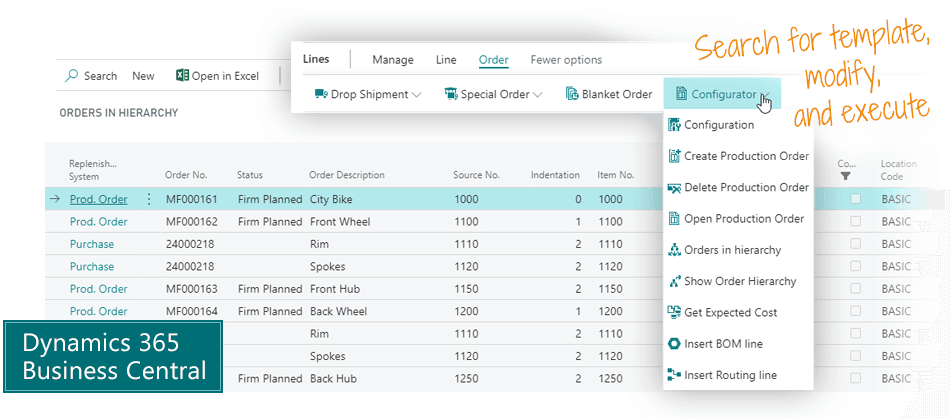
Use the Sales Configurator app to configure item hierarchies for sales orders efficiently without creating new item numbers for each sales order line in Business Central.

Main benefits of Sales Configurator
This app helps you customize a hierarchy of items specifically for a sales order line. This is what is typically called sales configuration.
You can also register order specific information on the sales order line, and the information will be inherited through all levels of the item hierarchy.
The Sales Configurator will create all necessary purchase and production orders, and you get many great features to optimize planning.
- Customize a hierarchy of items specifically for a sales order line.
- Manage master data through all levels of the hierarchy.
- Avoid creating a unique item number for each configuration.
- Search intelligently for items that fit the customer's needs.
- Select for each item and SKU if you want the Sales Configurator to do the planning or include it in the regular MRP.
- Overview the complete hierarchy with all purchases and productions.
- Calculate the expected cost of an item hierarchy bottom-up.

The typical problem with configurators
Most configurators will create tons of item numbers. Every configuration becomes a new item number, and every item number is only sold once.
Statistics on inventory becomes useless, and master data management is a mess. This is the typical problem with sales configurators.
The smart configurator
You select the closest matching item hierarchy, and when you add it to the sales order, you modify the bill-of-materials and route to the specific customer needs. The modifications are not saved to the item – they are saved to the sales order line.
This is a clever approach that doesn't fill up your item list with useless item numbers.
You may have an item number that has been sold a thousand times – but with individually configured components on each sales order.
Abakion is your one-stop shop for Apps



This is how you configure
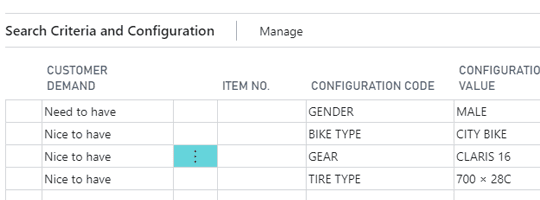
1. Search
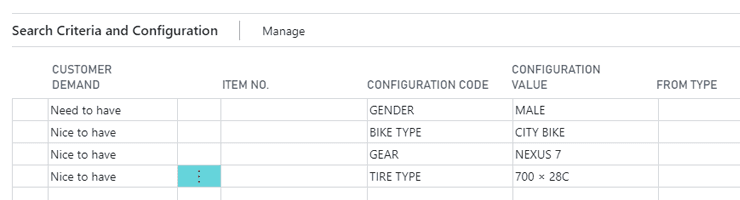
The app has a powerful search engine. You can enter a series of search criteria and select if each is need-to-have or nice-to-have. You may enter that it must be a men's bike and preferably a city bike. So, it will not suggest women's bikes, but it may show mountain bikes.
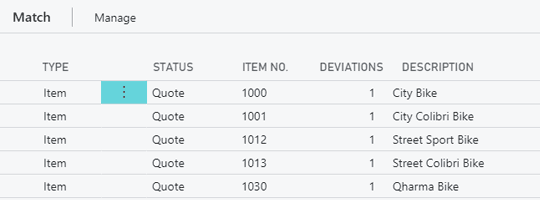
2. Select the best match
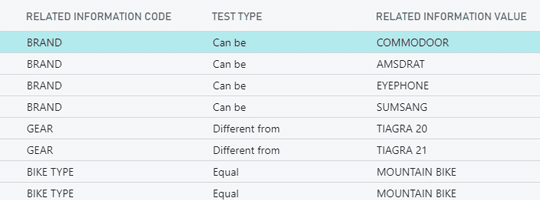
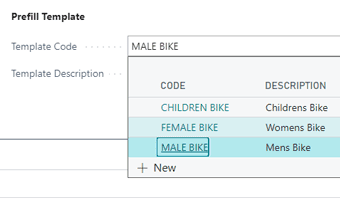
The search result is displayed with information about how well it fits your search criteria, and you can drill down into the differences. You can also save your search as a template, so you don't have to enter the same data next time.
Next step is to select the item number that matches the best what you were looking for. This is the item you will use as a template for the following steps.
3. Modify BOM and route
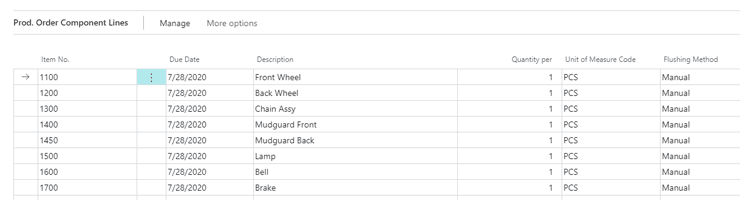
To make the selected item fit the customer's needs perfectly, you now modify the bill-of-materials and route for this specific sales order line.
The configurator doesn't create a new item – it just updates the components on the top level production order.
4. Create hierarchy
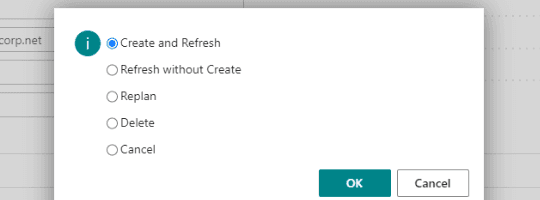
Finally, you ask the system to create and refresh all purchase orders and production orders.
You can activate this function, make more modifications, and activate it again, as often as you like until you are done.
5. Overview
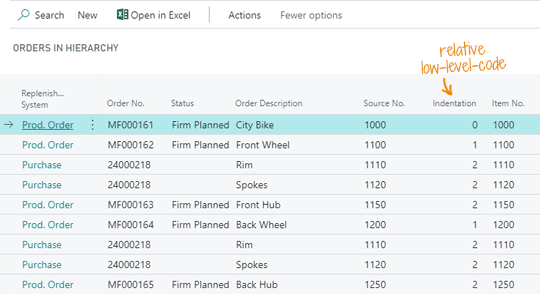
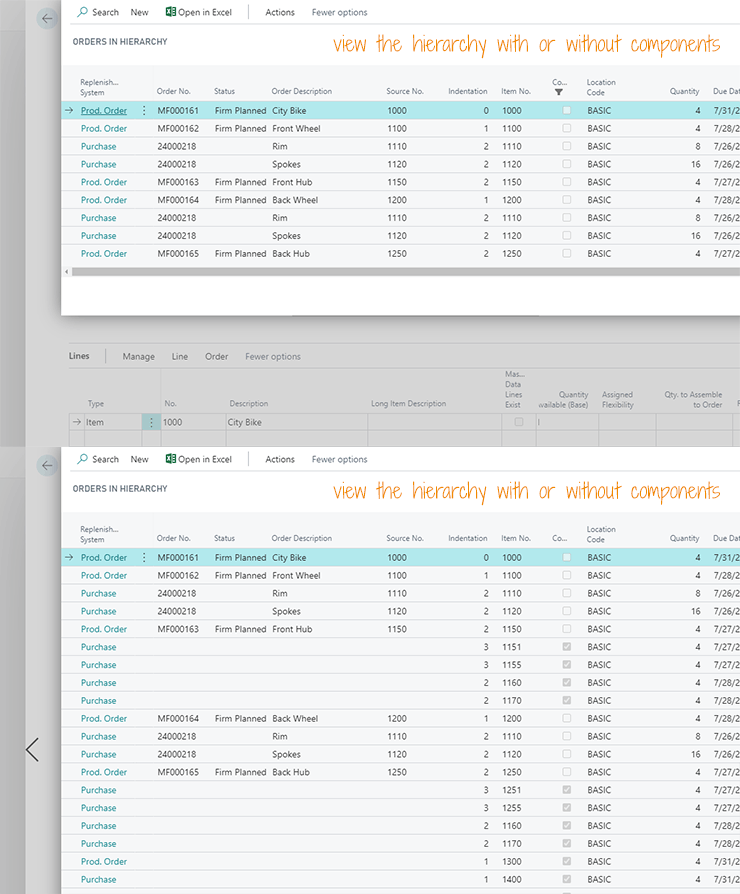
Then you can overview all the purchase and production orders in the hierarchy – in one and the same window. You can dive into each order and modify anything you like.
Purchase orders are bundled automatically. In this example, you can see 4 lines in this hierarchy require purchase of 2 item numbers, and they are bundled into one purchase order, because it is the same vendor.
Overviewing the complete hierarchy with purchases and productions is one of the great features of this app.
The features of Sales Configurator
Search
Search for items using master data
Based on master data information, you can search for the items that best fit the customer's requirements. Configure requirements to be "need-to-have" or "nice-to-have". From the search results, you can select the best fitting item and use it as a starting point for customizing a BOM and route for the sales order line.
Template for searching
When searching for best fit items, it is possible to prefill search criteria based on a template that reflects a customer's demand.
Drill down into differences
When searching for items, it is possible to drill down to see the differences between the demands and the search results.

Overview
Overview of the hierarchy
Overview all orders in the hierarchy – both production orders and purchase orders – and you can select to view the hierarchy with or without components.
Complex hierarchies
On items and SKUs you can select if it can be included in a hierarchy, and only items and SKUs with this setting are available for automatic planning by the Sales Configurator. Without this setting, you must purchase or MRP plan the item the traditional way.
If you have hierarchies with many levels, you may typically want to let the Sales Configurator manage the top levels of the hierarchies, whereas the lower levels should be handled with normal MRP planning. This is a great way to manage complex hierarchies.
Configure
Create the complete hierarchy directly from the sales order line
It is possible to change the BOM and routing for this specific sales order, directly on the sales order, before creating the order hierarchy – that will reflect the top-level changes.
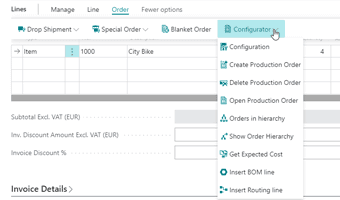
Configuration from the sales order line
A top-level production order is created directly from the sales order line.
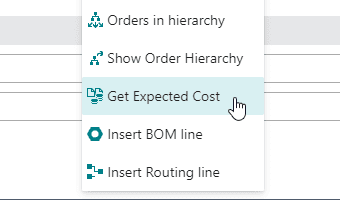
Expected cost
Expected cost can be calculated all through the hierarchy and summed up on the sales order line. Then you know what the sold item will cost to produce.
Logical dependencies
It's possible to substitute items on the BOM hierarchy with logical dependencies. Please note that the app doesn't support logical configuration to calculate dependent materials, areas, lengths etc.
Details
Manage master data through all levels of the hierarchy
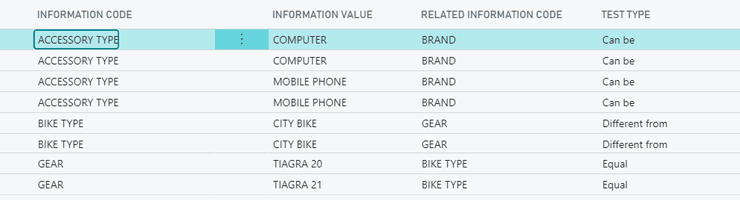
You can transfer master data on documents to production orders and purchase orders.
Sales Configurator will automatically include order specific data on the purchase order. You may have uploaded the customer's logo to the sales order, and when you purchase the item from the external supplier, the system will pass along the information about the logo that must be printed on the item.
Actually, you can pass all customer needs through all levels of the hierarchy to every production order and every purchase. Then everybody involved has the necessary order information available.
The app also requires the Master Data Information app.

Improve productivity
You can mark items in hierarchies. You can create a filter including the items in the hierarchy, and you can apply this filter in the MRP planning, in the item list, and anywhere else, and you can work exclusively on the items in the hierarchy you are currently planning.

Reference number
The reference number is the glue in the hierarchy, and it is transferred to production and purchase orders. No reservations or bindings are applied by the Sales Configurator.

Getting started with Sales Configurator
Get a 30-day free trial
Install the app Sales Configurator from Microsoft Marketplace. Available on the cloud edition of Business Central.
Get it on Marketplace »
Watch user guide videos
On Use Dynamics you can watch instructional videos to learn about the functionality of Sales Configurator.
Watch videos »
Sales Configurator pricing
Sales Configurator
Available on the cloud edition of Business Central. The more users you subscribe, the cheaper each becomes. Watch video about the price model »
Get Sales Configurator with 10 named users at €107,94 per user, per year. Annual subscription (You save 16,67%).
Subscribe »As part of the App Bundle
Get Sales Configurator as one of the 5 apps you can select with the App Bundle.
The App Bundle allows you to pick any 5 Abakion Apps at a great discount. Read more about the App Bundle »
If you need more than 5 apps, the price of any additional app is reduced to only €5,62 per app per month at 10 users (annual subscription).
Calculate your total price of multiple apps »
Talk to a real human
Have a chat with our app managers Bo H. Hansen and Thomas Halse about pricing and subscriptions:
✉ appsales@abakion.com
We will reply in English.
Support
If you have specific questions about functionality or how to get started, you may contact our support team at frontdesk@abakion.com or call us at +45 70 23 23 17. We will help you find the right video guides, if available.
We strive to provide you a qualified response as quickly as possible, at least within 24 hours but often much quicker.
At all times we will keep you informed about who is working on your support inquiry and how soon you can expect a response.