


Subscription Management for efficient invoicing of subscriptions
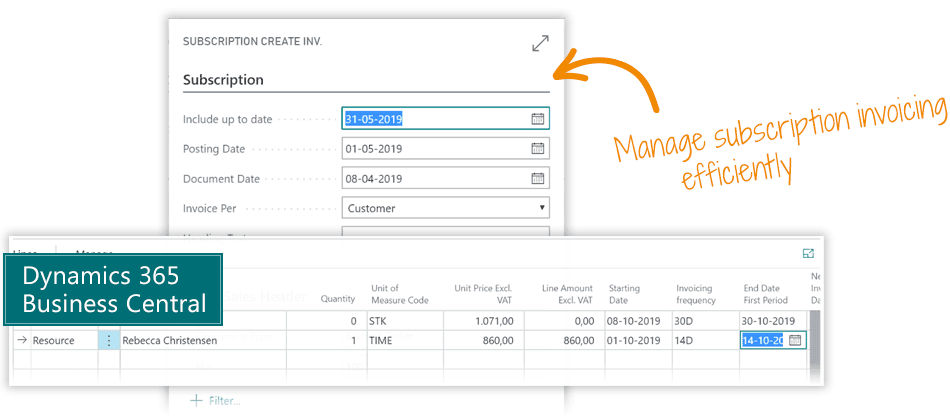
... the simple way to manage subscription invoices and payments on customers in Microsoft Dynamics 365 Business Central
Manage Subscriptions with Business Central
The Subscription Management app is the simple way to manage subscription invoices and payments on customers in Microsoft Dynamics 365 Business Central. It enables you to easily create subscription-based invoices.
You can set up and manage subscriptions on your own. There is no need for consulting services.
Abakion is your one-stop shop for Apps



Book a Q&A-session about the app
If you have questions about the app, you can sign up for a free Q&A-session with one of our experts. You can ask any questions you may have.
 Microsoft Teams · 20 minutes
Europe: 3 PM CEST / UK: 2 PM BST / East USA: 9 AM EDT
Microsoft Teams · 20 minutesEurope: 3:45 PM CEST / UK: 2:45 PM BST / East USA: 9:45 AM EDT
Subscription Management vs. Business Central Standard Subscription
With the Business Central fall release '24 (BC25), Microsoft allows Essential and Premium users to manage subscription billing, revenue, and expense recognition.
The new features include:
- Contracts for recurring billing of items and services
- Billing schedules with flexible parameters, catering to typical recurring billing use cases
- Usage-based billing
- Automated billing
- Deferral integration
- Revenue recognition based on billing schedules
- Contract updates (parameters and prices)
- Standard reports for contracts, customers, billing schedules, recognized revenue, future billing dates and amounts, etc. Most reports are available as Power BI reports
(source: Microsoft Learn)
For both current and new users of Abakion's Subscription Management app, this is good news. With the new release, two scenarios for managing a subscription business are now available:
- A solution that's easy to use and quick to implement (the Abakion app)
- A solution that supports more complex subscription setups (standard BC)
The Abakion app, Subscription Management, is designed to streamline and simplify subscription management tasks, making it ideal for companies needing to handle basic subscription activities without the complexity of a full-blown management system.
By focusing on essential features, the Abakion app ensures ease of use, quick setup, and efficient management of routine subscription tasks, allowing users to handle their subscriptions effortlessly and effectively.
- User-friendly interface: The app is designed with simplicity in mind, ensuring that users can easily navigate and manage their subscriptions
- Quick setup: Getting started with the app is straightforward and fast, allowing users to begin managing subscriptions without hassle
- Subscription tracking: Users can track active subscriptions, including renewal dates and payment details, to stay on top of their commitments
- Automated invoicing: The app allows users to create invoices via the standard Job Queue system, helping to avoid missed deadlines
- Customizable settings: Users can tailor subscription details to meet their specific needs
- Using standard: The Subscription Management app builds on standard BC — using Blanket Orders and standard Sales Invoices — so all routines remain the same as with non-recurring invoicing, simplifying tasks such as follow-ups and sending reminders
- Support for multiple subscriptions: The app supports managing multiple subscriptions across different services, all in one place
These features make the Abakion app an efficient tool for managing basic subscriptions without the complexity of a comprehensive management system.
Abakion's Subscription Management app can be used as a stand-alone solution or combined with the standard subscription setup. Simple subscriptions can be handled through the app, while more complex requirements can be managed using the new BC25 subscription features, which involve creating and maintaining customer contracts, offers, price lists, etc.
With the Abakion Subscription Management app, you now have even more flexibility in designing how your recurring services should be managed in Business Central.
Great features with Subscription Management
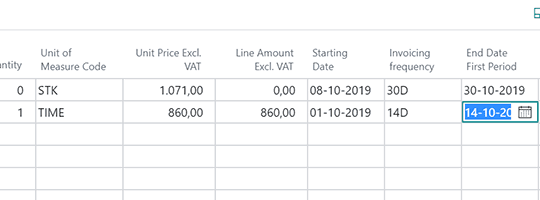
Flexible subscription schedules
For a single subscription order, per customer account, you can set subscription schedules per line item, resource or G/L account.
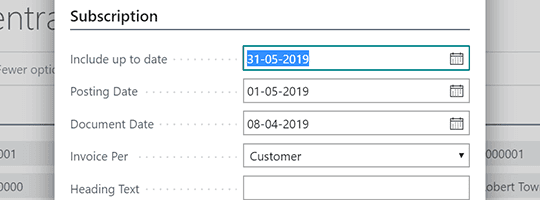
Bulk invoice creation
Use the Bulk Action feature to easily create subscription invoices per "next invoice date".
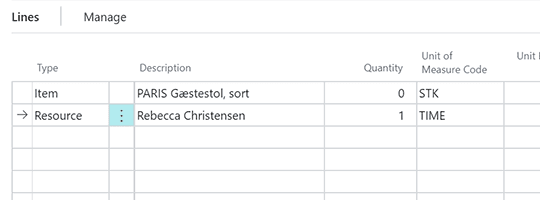
Customizable invoice text
Customize the text on your subscription invoice line to fit your customers' requirements.
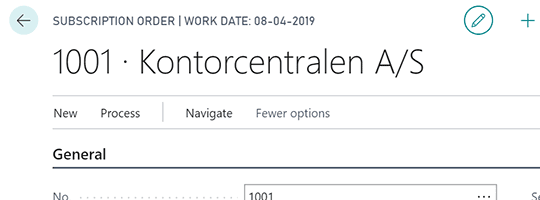
Deferrals, dimensions and discounts
Create deferral plans, dimensions, discounts and income recognition per line, as they are posted as individual lines.
Getting started with Subscription Management
Get a 30-day free trial
Install the app Subscription Management from Microsoft Marketplace. Available on the cloud edition of Business Central.
Get it on Marketplace »
Watch user guide videos
On Use Dynamics you can watch instructional videos to learn about the functionality of Subscription Management.
Watch videos »
Subscription Management pricing
Subscription Management
Available on the cloud edition of Business Central. The more users you subscribe, the cheaper each becomes. Watch video about the price model »
Get Subscription Management with 10 named users at €67,46 per user, per year. Annual subscription (You save 16,67%).
Subscribe »As part of the App Bundle
Get Subscription Management as one of the 5 apps you can select with the App Bundle.
The App Bundle allows you to pick any 5 Abakion Apps at a great discount. Read more about the App Bundle »
If you need more than 5 apps, the price of any additional app is reduced to only €5,62 per app per month at 10 users (annual subscription).
Calculate your total price of multiple apps »
Talk to a real human
Have a chat with our app managers Bo H. Hansen and Thomas Halse about pricing and subscriptions:
✉ appsales@abakion.com
We will reply in English.
Support
If you have specific questions about functionality or how to get started, you may contact our support team at frontdesk@abakion.com or call us at +45 70 23 23 17. We will help you find the right video guides, if available.
We strive to provide you a qualified response as quickly as possible, at least within 24 hours but often much quicker.
At all times we will keep you informed about who is working on your support inquiry and how soon you can expect a response.