


Manage Sales Orders to avoid partial deliveries and shortages using Shortage on Demand Orders
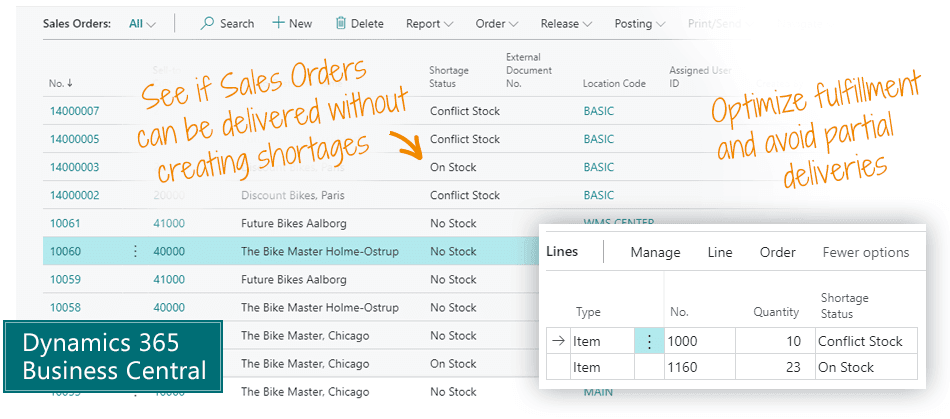
Shortage on Demand Orders is an app for Microsoft Dynamics 365 Business Central that helps you make intelligent decisions about which Sales Orders to prioritize when item shortages occur. This is a planning tool for companies wanting to optimize fulfillment of Sales Orders to avoid partial deliveries by moving delivery dates and not necessarily serving customers in the order they came.
Gain insight on shortages
Shortage on Demand Orders provides an overview of which Sales Orders you can fulfill completely or partially, or not at all. It helps you evaluate which orders you want to pick and ship.
On the Sales Order List and on each Sales Order Line, you get a status code that shows the inventory availability. Search for all Sales Orders with the status ‘On Stock’, and you know that you can deliver them all without worrying about shortages.
The ‘Conflict Stock’ status tells you that fulfillment is possible but will cause a shortage on another Sales Order. This way, 8 different status codes provide actionable insight for picking the right Sales Orders to deliver.
Shortage on Demand Orders also works for Production Orders, in which case the calculation is based on Component Shortage.

Main Benefits of Shortage on Demand Orders
For Warehouse Management
- See which Sales Orders can be released to pick, knowing they can be picked completely.
- See shortages on items from the top level and all the way down through the hierarchy.
- Start the day by picking all the Sales Orders that can be delivered completely. Then proceed with orders that can be delivered but cause shortages on other orders, and only then move on to partial deliveries.
For Sales
- Reduce the number of partial deliveries and partial invoices by helping the warehouse prioritize which sales orders you want delivered.
- The ability to promise clients that their order can be delivered without any problems, or to assess whether the order causes a conflict.
- Fewer shortage situations make happier customers.
For Finance
- Lower delivery costs when the number of partial deliveries is reduced.
- Happier clients because you can keep your order promises.
- Less frustration in the warehouse because picking becomes simpler.
Abakion is your one-stop shop for Apps



Book a Q&A-session about the app
If you have questions about the app, you can sign up for a free Q&A-session with one of our experts. You can ask any questions you may have.
 Microsoft Teams · 20 minutes
Europe: 3 PM CEST / UK: 2 PM BST / East USA: 9 AM EDT
Microsoft Teams · 20 minutesEurope: 3:45 PM CEST / UK: 2:45 PM BST / East USA: 9:45 AM EDT
Great features with Shortage on Demand Orders
Shortages on Sales Orders
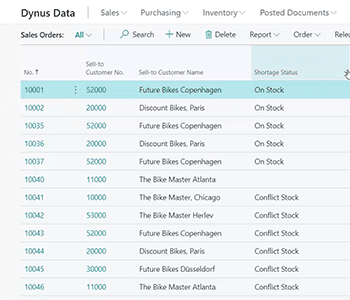
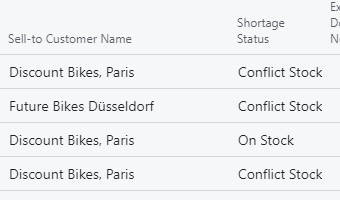
See which Sales Orders can be delivered without creating backlogs.
Shortages are calculated bottom-up
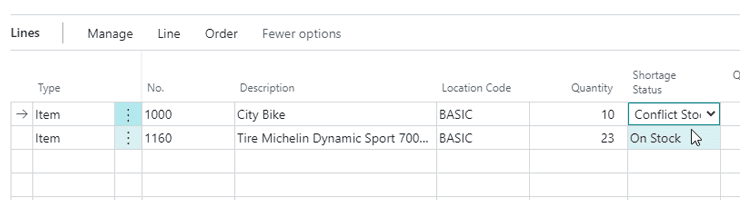
The Shortage Status is calculated for each Sales Order line, and the “worst” Shortage Status is transferred to the Sales Header. This way you can easily see if the order can be shipped completely, or you can see which Sales Order Lines cause the backlogs.
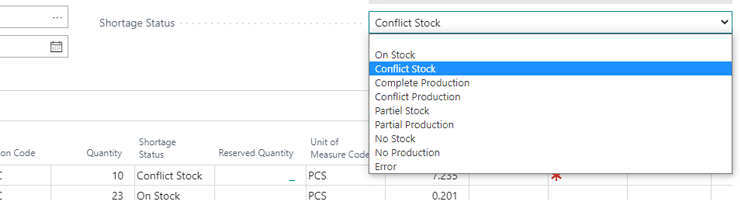
Shortage status codes
You have 8 status codes and 1 error message available. The many levels of shortage status provide you actionable insight into the exact status of item and component availability.
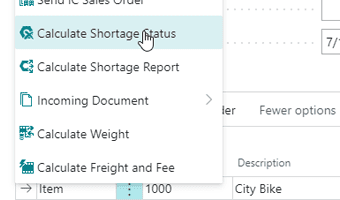
Calculate shortage on a Sales Order
You can activate an update of the Shortage Status on a single Sales Order. Then you have up-to-date information.
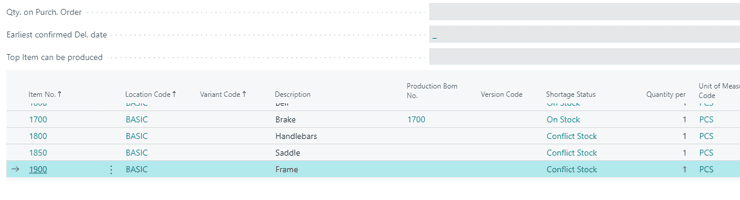
Drill down the Production hierarchy
If you use Production, it is possible to drill down through the complete hierarchy to figure out which components on lower levels result in problems on a Sales Order Line.
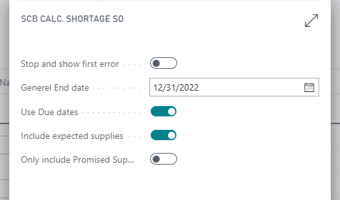
Bulk update all shortage statuses
Initiate a calculation of shortages throughout all Sales Orders. Customize the filters and settings for the calculation. A similar process is available for Production Orders.
The way to understand the different statuses of Shortage on Demand Orders
- (Blank): No Shortage is calculated or the Outstanding Quantity on the line is blank.
- On Stock: There are enough items on stock to cover all demands within the period selected.
- Conflict Stock: There are enough items on stock within the period to cover the demand on the line, but not to cover all Sales Order demands for the item.
- Complete Production: There are not enough items on stock to cover the demand, but there are enough components to create a Production Order and produce the item, and none of the components will conflict and run out of stock on other demands.
- Conflict Production: There are not enough items on stock to cover the demand, but there are enough components to create a Production Order and produce the item, though not enough components to cover all demands for the components.
- Partial Stock: There are not enough items on stock to cover the demand, and not enough components to produce the full demand on the line, but some items are on stock, and the demand can be partially supplied.
- Partial Production: There are no items on stock, but there are components to produce part of the demand on the line, though not the full quantity.
- No Stock: There is none of this item on stock at all.
- No Production: There is none of this item on stock at all, and if it is a produced item, there are no components to produce a single item.
- Error: Error on the calculation, for example Production Bill of Material lines that are not certified, or a Production calendar that is not calculated.
Getting started with Shortage on Demand Orders
Get a 30-day free trial
Install the app Shortage on Demand Orders from Microsoft Marketplace. Available on the cloud edition of Business Central.
Get it on Marketplace »
Read the step-by-step guide
We guide you from installation and configuration to your first use of Shortage on Demand Orders.
Read the guide »
Watch user guide videos
On Use Dynamics you can watch instructional videos to learn about the functionality of Shortage on Demand Orders.
Watch videos »
Shortage on Demand Orders pricing
Shortage on Demand Orders
Available on the cloud edition of Business Central. The more users you subscribe, the cheaper each becomes. Watch video about the price model »
Get Shortage on Demand Orders with 10 named users at €107,94 per user, per year. Annual subscription (You save 16,67%).
Subscribe »As part of the App Bundle
Get Shortage on Demand Orders as one of the 5 apps you can select with the App Bundle.
The App Bundle allows you to pick any 5 Abakion Apps at a great discount. Read more about the App Bundle »
If you need more than 5 apps, the price of any additional app is reduced to only €5,62 per app per month at 10 users (annual subscription).
Calculate your total price of multiple apps »
Talk to a real human
Have a chat with our app managers Bo H. Hansen and Thomas Halse about pricing and subscriptions:
✉ appsales@abakion.com
We will reply in English.
Support
If you have specific questions about functionality or how to get started, you may contact our support team at frontdesk@abakion.com or call us at +45 70 23 23 17. We will help you find the right video guides, if available.
We strive to provide you a qualified response as quickly as possible, at least within 24 hours but often much quicker.
At all times we will keep you informed about who is working on your support inquiry and how soon you can expect a response.