


Labels Mobile prints labels with barcodes from Business Central
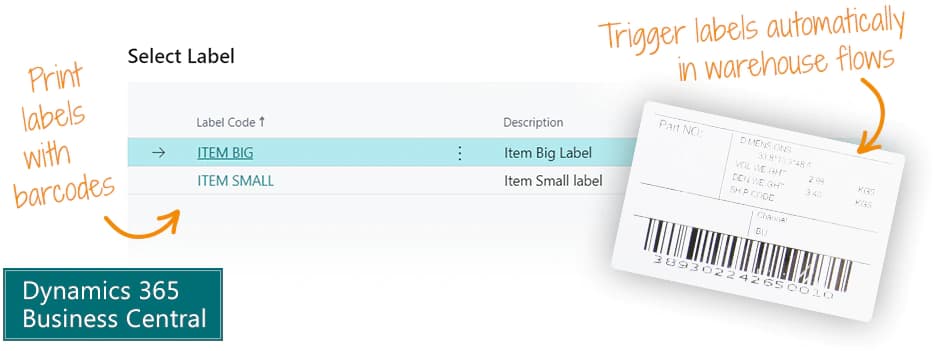
The Labels Mobile app enables you to print labels with barcodes from Business Central, as part of any process, like warehouse processes, through your preferred label software.
Labels Mobile is a framework that can assemble a data set in Business Central - and that data set can be sent to a labels program, e.g. BarTender or Easylabel.
Abakion is your one-stop shop for Apps



Book a Q&A-session about the app
If you have questions about the app, you can sign up for a free Q&A-session with one of our experts. You can ask any questions you may have.
 Microsoft Teams · 20 minutes
Europe: 3 PM CET / UK: 2 PM GMT / East USA: 9 AM EST
Microsoft Teams · 20 minutesEurope: 3:45 PM CET / UK: 2:45 PM GMT / East USA: 9:45 AM EST
Create data set
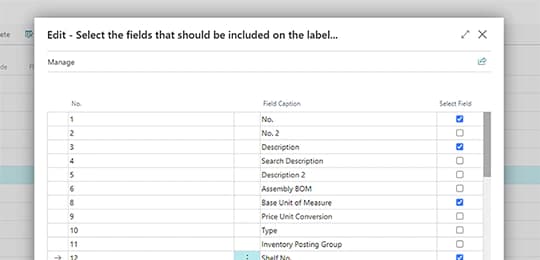
The Labels Mobile app produces a data set in Business Central from any table and any fields you like.
Traditionally you must create a report in Business Central to achieve this, which requires development. It's expensive to develop and expensive to maintain.
With this app, you can create a label data set without programming, and without any technical skills. A wizard guides you through the selection of tables and fields.
And there is no maintenance.
Trigger labels
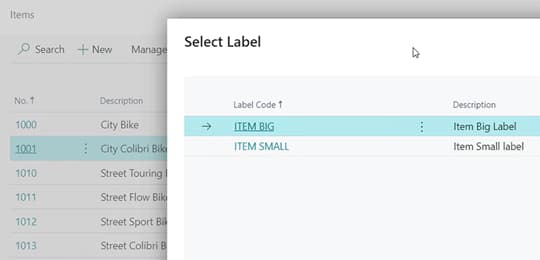
You can include your label in warehouse flows and have events in the flow trigger a label print.
You can also print labels manually, but triggering label print automatically as part of your workflows is pretty smart.
You can print labels from Items, Sales Orders, Purchase Orders, Production Orders and Warehouse documents.
Print through label software
Your preferred barcode/label software holds your label templates.
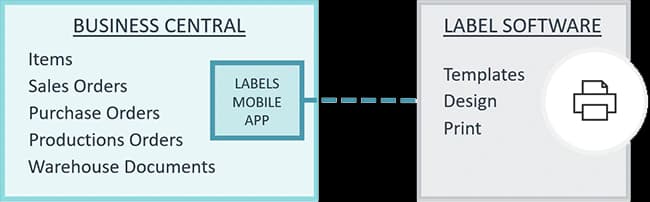
Labels Mobile simply connects Business Central with label and barcode software, like BarTender from Seagull Scientific or Easylabel from Tharo Systems.
When a label print is triggered, Business Central sends the dataset to your label software, and the label template is populated and printed.
For Partners
Labels Mobile is a versatile tool for Business Central partners who want to deliver a labels solution to the end customer - without having to produce and maintain customer extensions in the cloud solution.
Labels Mobile is a flow tool to output data, and in combination with the labels/barcode layout software, like BarTender or Easylabel, you have a complete solution for your end customer.
Getting started with Labels Mobile
Get a 30-day free trial
Install the app Labels Mobile from Microsoft Marketplace. Available on the cloud edition of Business Central.
Get it on Marketplace »
Labels Mobile pricing
Labels Mobile
Available on the cloud edition of Business Central. The more users you subscribe, the cheaper each becomes. Watch video about the price model »
Get Labels Mobile with 10 named users at €67,46 per user, per year. Annual subscription (You save 16,67%).
Subscribe »As part of the App Bundle
Get Labels Mobile as one of the 5 apps you can select with the App Bundle.
The App Bundle allows you to pick any 5 Abakion Apps at a great discount. Read more about the App Bundle »
If you need more than 5 apps, the price of any additional app is reduced to only €5,62 per app per month at 10 users (annual subscription).
Calculate your total price of multiple apps »
Talk to a real human
Have a chat with our app managers Bo H. Hansen and Thomas Halse about pricing and subscriptions:
✉ appsales@abakion.com
We will reply in English.
Support
If you have specific questions about functionality or how to get started, you may contact our support team at frontdesk@abakion.com or call us at +45 70 23 23 17. We will help you find the right video guides, if available.
We strive to provide you a qualified response as quickly as possible, at least within 24 hours but often much quicker.
At all times we will keep you informed about who is working on your support inquiry and how soon you can expect a response.