


Dynamic Data Exchange makes it simple to set up integrations
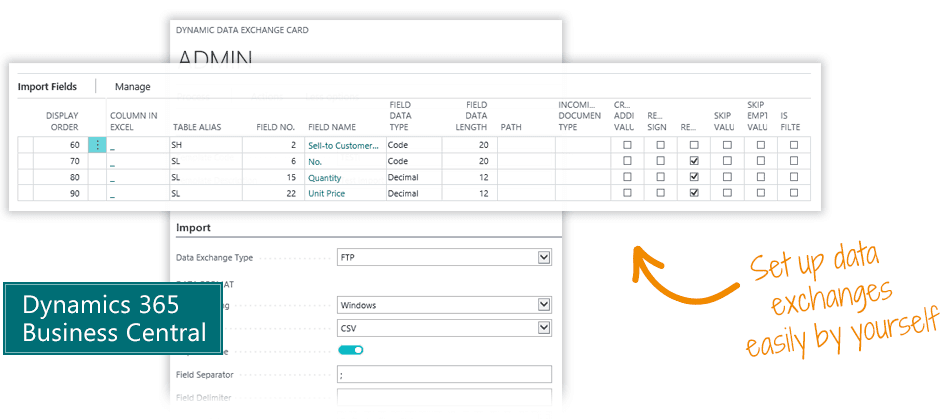
The Dynamic Data Exchange app is a powerful yet simple way to set up integrations and data imports in Microsoft Dynamics 365 Business Central – without having to spend a lot of money on developing custom import functionality.Companies often spend many hours developing import functionality for data connections, but that is no longer needed with this app.With Dynamic Data Exchange, a new integration can be set up entirely using data settings. You may do it yourself or get a consultant to do it. Either way, it's quite simple.No more costly development of your simple integrations.
These are your benefits with Dynamic Data Exchange
- Set up integrations on your own
- Many features - simple interface
- No need for consulting services
- No programming - all is done with data settings
...and these are the most popular features
- Automated, scheduled integrations
- No limit to number of integrations or amount of data
- Multiple protocols, like FTP, Webservice, SOAP, REST
- Multiple data types like CSV, XML, JSON
- Simple mapping of tables and fields
- Merge, crop, calculate, translate, format etc.
- Map external account numbers to your chart of accounts
Abakion is your one-stop shop for Apps



How to set up an import with Dynamic Data Exchange
Name of import
1. When you open the Dynamic Data Exchange Card, first of all, in the "General" tab you enter an import name and a responsible person.

Import types
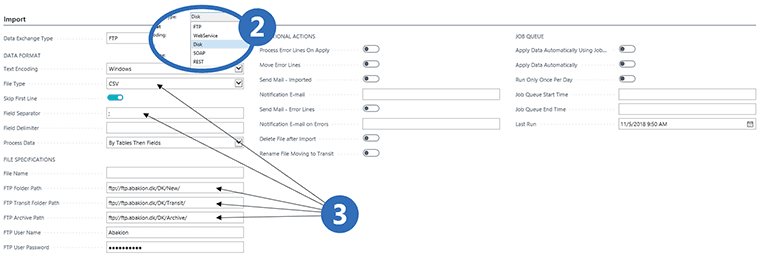
2. In the Import tab, first select the type of data exchange, like FTP, Webservice or API.
3. Now you can set the data format and the file specifications. By default, the file is uploaded to a "New" folder and moved after posting to an "Archive" folder. This is where you control the general format of the file, and how the file should be read.
Automation
Actions and Job Queue
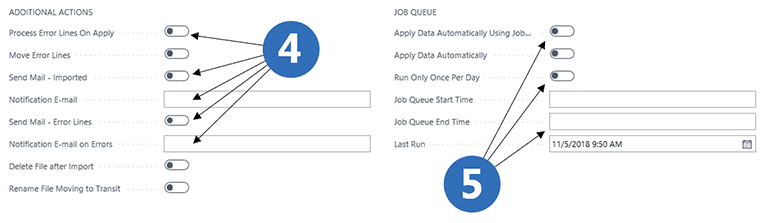
4. In Additional Actions, you can set up how the system reacts when encountering an error - and which actions should be triggered in case of errors or successful imports/exports.
5. In the Job Queue section, you can decide if import/export should be automated - and the frequency of the automated job queue.
Tables and Fields
Import tables
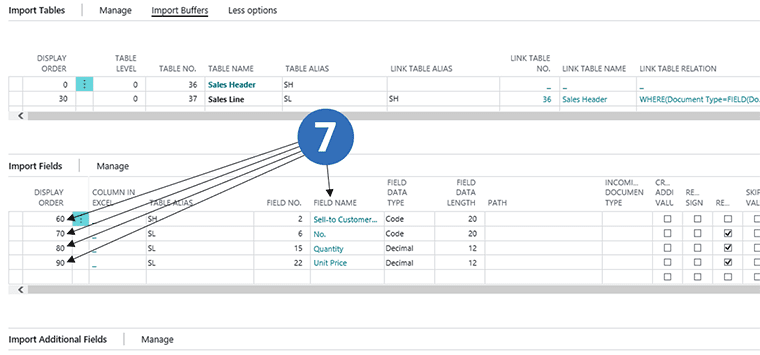
6. At the bottom of the Dynamic Data Exchange Card, you can specify which tables in Business Central should be updated with the imported data. You can select multiple tables in the same import.

Import fields
7. Now you specify the file structure of the import file, field by field.
Control Data
Import settings
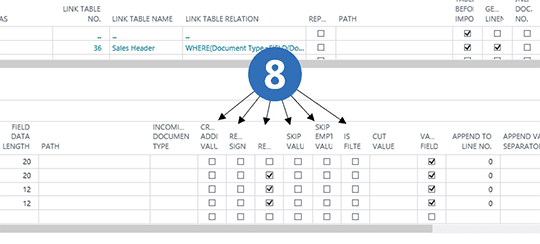
8. You have many settings to control how data is updated into your ERP system:
- Create parallel data, i.e. if no type of financial transactions is specified.
- Specify that values will enter with opposite sign.
- Repeatable data, i.e. data in an input line about one sales header and several sales lines.
- Skip a value that should not be imported.
- Crop a description field by either shortening the text from the beginning or the end.
- Determine which data should be validated when entering the ERP system.
Manipulate Data
Many options
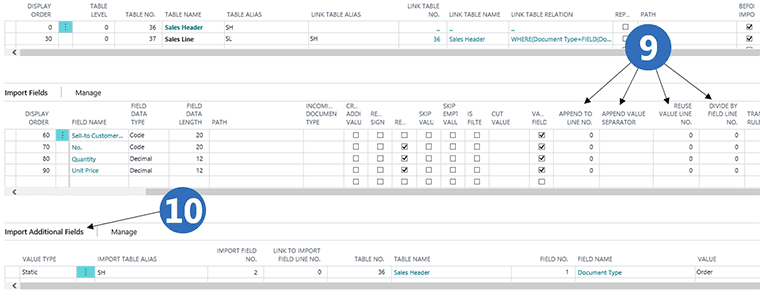
9. You have many more options:
- Merge data, i.e. if several fields contain descriptions, we can merge the fields for a complete description.
- Specify a special field separator in the concatenated field.
- Use the value of one field in another field, even if it was not present in the import file.
- Divide the value of one field by the value of another field, in the case that input data only has a total amount and quantity, but we also need the price.
10. Set up additional data not directly provided by the external system. In this case the import generates an order.
Translate data
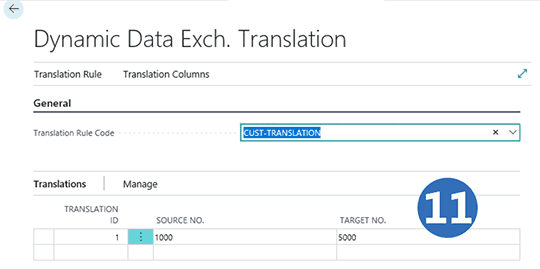
11. You can also translate data, in case you communicate with subsystems that use different accounting numbers. This is an example where we receive account 1000 from the external system, and when imported it is translated into account 5000. In this way, we ensure a high degree of flexibility when communicating with external systems.
Translate date format
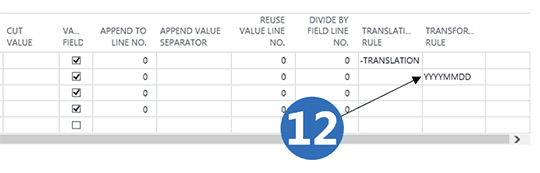
12. You can set rules for how to read date fields: if dates are received in one format, they can be translated into the date format used by your system.
Getting started with Dynamic Data Exchange
Get a 30-day free trial
Install the app Dynamic Data Exchange from Microsoft Marketplace. Available on the cloud edition of Business Central.
Get it on Marketplace »
Dynamic Data Exchange pricing
Dynamic Data Exchange
Available on the cloud edition of Business Central. The more users you subscribe, the cheaper each becomes. Watch video about the price model »
Get Dynamic Data Exchange with 10 named users at €107,94 per user, per year. Annual subscription (You save 16,67%).
Subscribe »As part of the App Bundle
Get Dynamic Data Exchange as one of the 5 apps you can select with the App Bundle.
The App Bundle allows you to pick any 5 Abakion Apps at a great discount. Read more about the App Bundle »
If you need more than 5 apps, the price of any additional app is reduced to only €5,62 per app per month at 10 users (annual subscription).
Calculate your total price of multiple apps »
Talk to a real human
Have a chat with our app managers Bo H. Hansen and Thomas Halse about pricing and subscriptions:
✉ appsales@abakion.com
We will reply in English.
Support
If you have specific questions about functionality or how to get started, you may contact our support team at frontdesk@abakion.com or call us at +45 70 23 23 17. We will help you find the right video guides, if available.
We strive to provide you a qualified response as quickly as possible, at least within 24 hours but often much quicker.
At all times we will keep you informed about who is working on your support inquiry and how soon you can expect a response.