


Send personalized emails your recipients will trust with the Document Handling app for Business Central
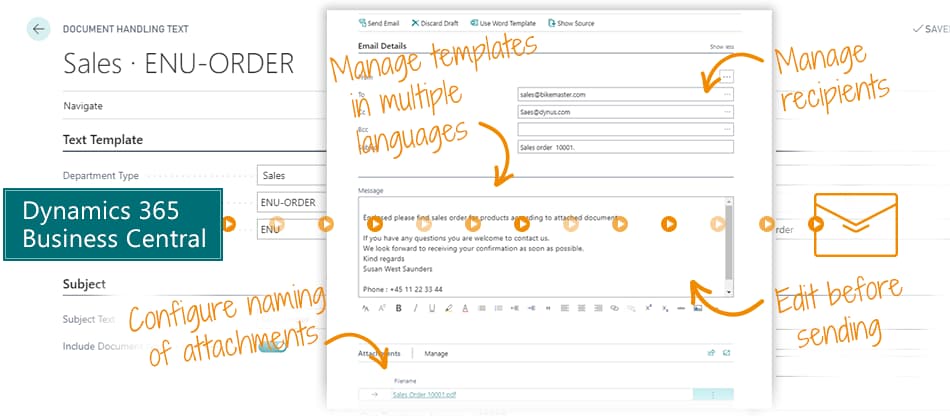
Document Handling provides you a full-featured solution to send emails with documents attached from Microsoft Dynamics 365 Business Central.
This is why your Business Central needs Document Handling
In Sales you want to email order confirmations, invoices and more to the customers. In Purchasing you want to email purchasing documents to the suppliers.
Out-of-the-box Business Central may get you some of the way, but Document Handling enables you to easily manage language versioning, edit the email content before sending, personalize, manage multiple recipients and more.
It's everything you need to send email with attached documents from Business Central.
It's also about trust
Many system-generated emails are not trusted, because they are not personalized and understandable for the recipient. Don't let your invoice be mistaken for a malicious email attachment. It's bad for your brand – and you don't get paid.
When you personalize the email, send it from your own email address, use the right language and name the attachment with an understandable name in the correct language – then your email will be trusted.
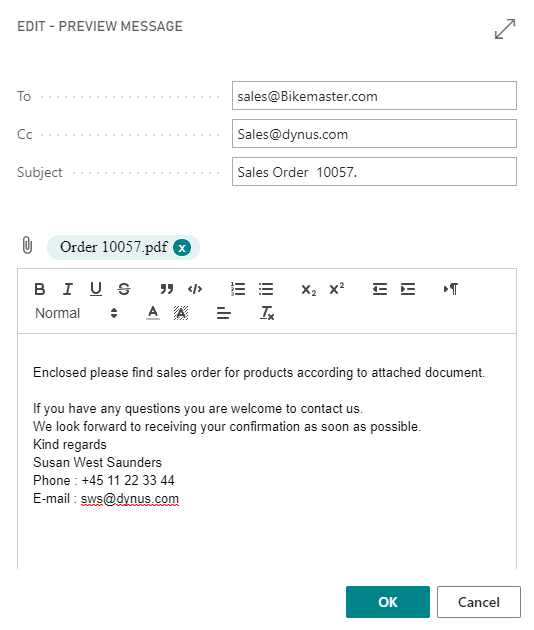
Main features
- Use templates: create email templates for different purposes, like quotes, invoices, order confirmations, shipment notes and credit notes.
- Manage multiple languages: manage language versioning of email templates. Translate your invoice template into 12 languages, and the language code on the specific customer determines your email language. If your recipient speaks Spanish, they automatically get the Spanish version of the email template.
- Select recipients: select multiple recipient email addresses from the customer or vendor card. Add recipients as CC or BCC – you are not confined to a primary contact.
- Make more sense: configure the naming of the attached documents – and let it reflect your language versioning. An English-speaking recipient receives an "Invoice" document, and a French-speaking recipient receives a "Facture". This makes much more sense for the recipient, and attachments are not mistaken for being malicious.
Abakion is your one-stop shop for Apps



The features of Document Handling
Purpose and language specific templates
Design customized email templates for various purposes such as quotes, invoices, order confirmations, shipment notes and credit notes. Efficiently manage each template in multiple languages to cater to your diverse customer base.
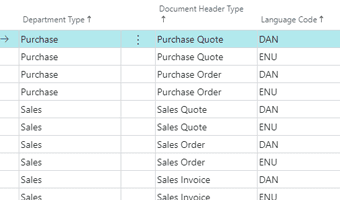
Language versioning of attachment naming
Effortlessly attach documents to emails and customize their names based on the client's language, ensuring smooth and efficient processing for your clients.
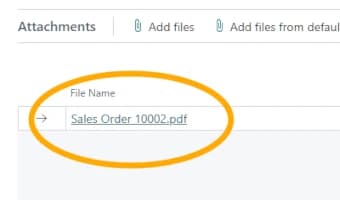
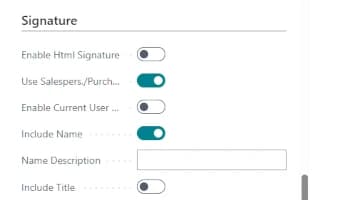
Dynamic email signatures
Automatically generate email signatures that include the name and contact information of the sales or purchase person, along with the company logo and other relevant details.
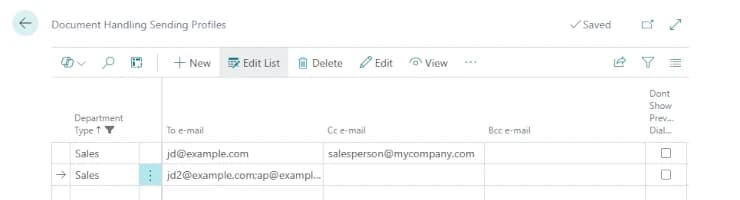
Set multiple recipients for your emails
For each of your customers or vendors, you can specify as many recipients as needed. Indicate whether each recipient should be in the 'To', 'CC' or 'BCC' field to match your requirements.
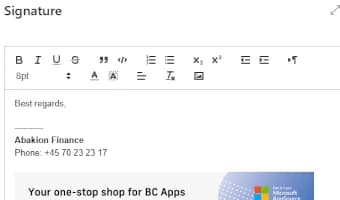
Use HTML to customize email signatures
Add a generic email signature to your emails and easily edit it in HTML to enrich it with company logo and more.
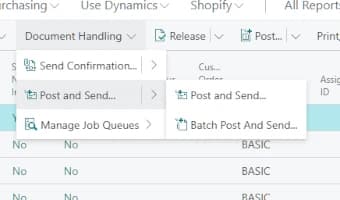
Batch post and send orders
Post and send orders in a single step, or opt to batch post and send multiple orders simultaneously.
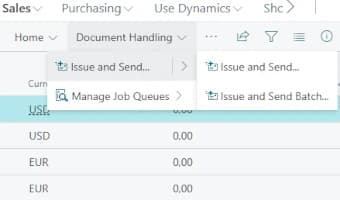
Issue and send reminders
Easily issue one or several reminders in one step.
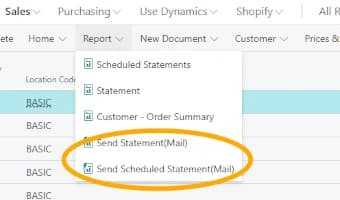
Send statements automatically
Forward statements upon request or automate the process by using job queues to send them automatically.
Getting started with Document Handling
Get a 30-day free trial
Install the app Document Handling from Microsoft Marketplace. Available on the cloud edition of Business Central.
Get it on Marketplace »
Watch user guide videos
On Use Dynamics you can watch instructional videos to learn about the functionality of Document Handling.
Watch videos »
Document Handling pricing
Document Handling
Available on the cloud edition of Business Central. The more users you subscribe, the cheaper each becomes. Watch video about the price model »
Get Document Handling with 10 named users at €107,94 per user, per year. Annual subscription (You save 16,67%).
Subscribe »As part of the App Bundle
Get Document Handling as one of the 5 apps you can select with the App Bundle.
The App Bundle allows you to pick any 5 Abakion Apps at a great discount. Read more about the App Bundle »
If you need more than 5 apps, the price of any additional app is reduced to only €5,62 per app per month at 10 users (annual subscription).
Calculate your total price of multiple apps »
Talk to a real human
Have a chat with our app managers Bo H. Hansen and Thomas Halse about pricing and subscriptions:
✉ appsales@abakion.com
We will reply in English.
Support
If you have specific questions about functionality or how to get started, you may contact our support team at frontdesk@abakion.com or call us at +45 70 23 23 17. We will help you find the right video guides, if available.
We strive to provide you a qualified response as quickly as possible, at least within 24 hours but often much quicker.
At all times we will keep you informed about who is working on your support inquiry and how soon you can expect a response.