


Created-by on Documents keeps track of who created the documents
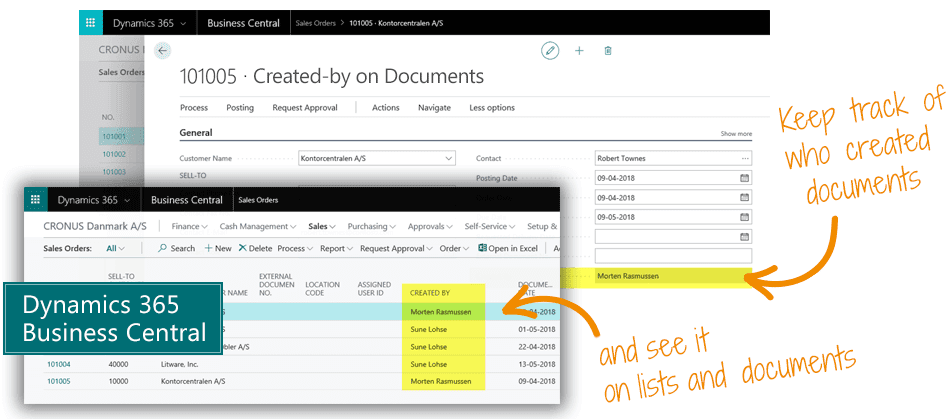
Created-by on Documents is a simple and free extension that helps you to get insight into who created the original documents.
Created-by on Documents just tracks who creates documents in Business Central - that's it.
Have you ever wanted to track who created the original Sales Order or Purchase Order?
And to your surprise, this information is generally not available in your Microsoft Dynamics 365 Business Central.
Created-by on Documents is a simple and free extension that helps you to get insight into who created the original documents.
When you have installed Created-by on Documents in your Dynamics 365 Business Central, it simply enables a "Created by" field which is displayed on the "General" fast-tab on the various Sales and Purchase Documents and in the various Order lists.
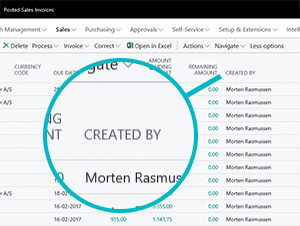
When you enter an order - the "Created by" field will automatically be populated with the name of the user, and it will automatically keep track of the users on archived documents and posted documents - easily viewable for tracking purposes.
Abakion is your one-stop shop for Apps



... works on all these documents
- Sales Order
- Sales Order List
- Sales Quote
- Sales Quote List
- Sales Invoice
- Sales Invoice List
- Sales Credit Memo
- Sales Credit Memo List
- Sales Return Order
- Sales Return Order List
- Blanket Sales Order
- Blanket Sales Order List
- Posted Sales Shipment
- Posted Sales Shipment List
- Posted Sales Invoice
- Posted Sales Invoice List
- Posted Sales Credit Memo List
- Purchase Order
- Purchase Order List
- Purchase Quote
- Purchase Quote List
- Purchase Credit Memo
- Purchase Credit Memo List
- Purchase Return Order
- Purchase Return Order List
- Blanket Purchase Order
- Blanket Purchase Order List
- Posted Purchase Receipt
- Posted Purchase Receipt List
- Posted Purchase Invoice List
- Posted Purchase Credit Memo
- Posted Purchase Credit Memo List
This is what you do to get started
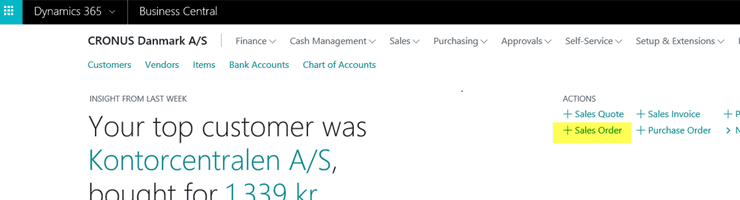
1. Create a Sales Order
Open your Dynamics 365 Business Central and create a new Sales Order.
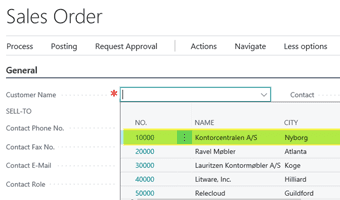
2. Select the Customer
Enter the Customer No. and select the Customer.
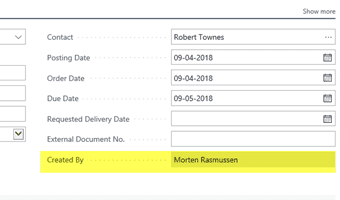
3. Created-by is populated
The Created-by will automatically populate after the Customer is selected on the new order.
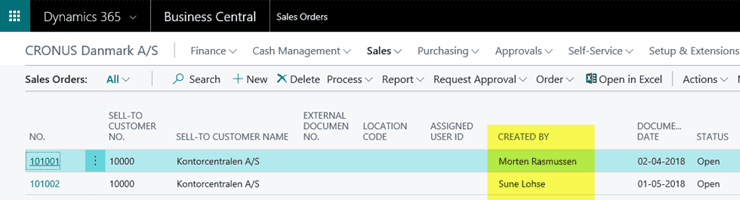
4. See it in the list view
When finished, the Created-by will display in the Sales Order list view. Now, repeat these steps for other purchase and sales documents. That's all.
Getting started with Created-by on Documents
Get the app for free now
Install the app Created-by on Documents from Microsoft Marketplace. Available on the cloud edition of Business Central.
Get it on Marketplace »

Talk to a real human
Have a chat with our app managers Bo H. Hansen and Thomas Halse about pricing and subscriptions:
✉ appsales@abakion.com
We will reply in English.
Support
If you have specific questions about functionality or how to get started, you may contact our support team at frontdesk@abakion.com or call us at +45 70 23 23 17. We will help you find the right video guides, if available.
We strive to provide you a qualified response as quickly as possible, at least within 24 hours but often much quicker.
At all times we will keep you informed about who is working on your support inquiry and how soon you can expect a response.